Rails deployment is so easy these days
I have been meaning to blog about Phusion Passenger for a while as about 3-4 months ago we migrated Stubmatic from using Apache / Mongrel Cluster to Phusion Passenger A.K.A. mod_rails.
Mod rails is extreamly easy to install. Make sure you update gem first:
gem update --systemThen install the Phusion Passenger gem
gem install passengerOnce complete you can run the Phusion Passenger install that compiles mod_rails for you.
passenger-install-apache2-moduleOnce this completes it will give you some code to past into your httpd.conf file and you are ready to start configuring your sites.. Well actually if you have been using Mongrels then time to strip most of the configuration out of your https.conf file. You can have as simple a configuration as shown below. Note: The DocumentRoot should be set to the public folder within your app. Passenger automatically detects that this is a rails app.
ServerName www.stubmatic.com
DocumentRoot /websites/stubmatic/public
One thing to note is that by default Passenger disables ModRewrite for that VirtualHost and in our case we use ModRewrite for a number of things such as providing a Maintenance page when maintenance.html is in our public folder allowing us to take the app offline. We also use ModRewrite to hide .svn folders, so we needed to use ModRewrite. Thankfully Passenger provides a solution. Note: You must first make sure you remove the .htaccess file in your rails public folder!
So our new Apache configuration looks like this:
ServerName www.stubmatic.com
DocumentRoot /websites/stubmatic/public

RailsAllowModRewrite on

RewriteEngine On

RewriteRule ^(.*/)?.svn/ - [F,L]

RewriteCond %{DOCUMENT_ROOT}/maintenance.html -f
RewriteCond %{SCRIPT_FILENAME} !maintenance.html
RewriteRule ^.*$ /maintenance.html [L]
If you want to setup an Apache / Phusion Passenger testing server you will also need to add the following directive to your VirtualHost configuration:
RailsEnv developmentAs you can see Phusion Passenger make deployment of Ruby on Rails as trivial as deploying a PHP. You can easily reload Phusion Passenger by running the following command from within your Rails project root.
touch tmp/restart.txtIn terms of performance, Phusion Passenger holds it's own against Mongrel and there are plenty of details on Phusion's website.
For more information:
Excellent OS X SQLite 3 management & Query app
iPhone and Adobe Air developers (as well as any others that use SQLite 3) Menial has just released an excellent little app for creating, managing and running queries against SQLite 3 databases called Bases.
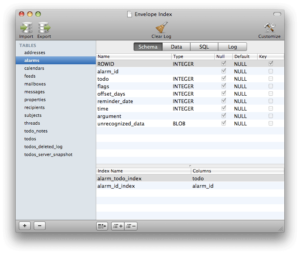
The application is simple to use, very user friendly and has worked well from the testing I have done. It costs just £10 and there is a free trial available so you can try before you buy.
Creating a two-way binding between Model and Form in Flex
A quick sorry to all my Flex readership for the lack of Flex related posts these last few months. I though I would drop a quick tip / class I often use to create a two way binding between a form to a corresponding class model.
Flex provides a one way binding through its <mx:Binding> tags, if you are unfamiliar with this tag check out the section on them in Adobe's Flex quick start guide. However if you want changes made to the model reflected in the form as well as changes made to the form reflected back in the model you need to set up two way bindings. To simplify this I have created a helper class (listed below) which then allows me to establish a two way binding.
package com.vibrant.components.Forms
{
	import flash.display.DisplayObject;

	import mx.binding.utils.BindingUtils;
	import mx.binding.utils.ChangeWatcher;

	public class ModelBinding
	{

		private var _modelWatcher		: ChangeWatcher;
		private var _componentWatcher		: ChangeWatcher;
		private var bindingsAreEstablished	: Boolean = false;

		public function ModelBinding()
		{
		}

		/**
		 * Property field
		 * @default null
		 */

		private var _model : Object;

		public function set model( value : Object ):void
		{
			_model = value;
			updateBinding();
		}

		public function get model() : Object
		{
			return _model;
		}

		/**
		 * Property field, field within model to bind
		 * @default ""
		 */

		private var _field:String;

		public function set field( value : String ):void
		{
			_field = value;
			updateBinding();
		}

		public function get field() : String
		{
			return _field;
		}

		/**
		 * Property: target, component to tartget binding from model to.
		 */

		private var _target : Object;

		public function set target( value : Object ):void
		{
			_target = value;
			updateBinding();
		}

		public function get target() : Object
		{
			return _target;
		}

		/**
		 * Property: property, to bind to on target component
		 */

		private var _property : String = "text";

		public function set property( value : String ):void
		{
			_property = value;
			updateBinding();
		}

		public function get property() : String
		{
			return _property;
		}

		/**
		 * @private
		 * Updates bindings between component and model
		 *
		 */
		private function updateBinding() : void
		{
			if ( bindingsAreEstablished ) clearBindings();

			if ( model != null &&  model.hasOwnProperty( field )
				&& target != null && target.hasOwnProperty( property ) )
			{
				_modelWatcher = BindingUtils.bindProperty( target, property, model, field );
				_componentWatcher = BindingUtils.bindProperty( model, field, target, property );
				bindingsAreEstablished = true;
			}
		}

		/**
		 * Clears bindings
		 *
		 */
		private function clearBindings() : void {

			if ( _modelWatcher != null )
			{
				_modelWatcher.unwatch();
				_modelWatcher = null;
			}

			if ( _componentWatcher != null )
			{
				_componentWatcher.unwatch();
				_componentWatcher = null;
			}
			bindingsAreEstablished = false;
		}

	}
}
This class basically takes a model class, that has the data you would like to setup the bindings with in. The field name, the name of the property within the model class to bind to. A target, the form component to establish the view side binding with and finally you can specify an optional property that the binding should be made to on the form element. If unspecified, the 'property' defaults to "text" as this is the most often used property to bind to. So for example given the following User model:
public class UserModel
{
    public var firstName : String;
    public var lastName : String;

	public function UserModel()
	{
	}
}
We could set up a binding to a TextInput as follows:
...
<mx:Script>
	<![CDATA[
		public var userModel : UserModel;
	]]>
</mx:Script>
<mx:Form>
	<mx:FormItem label="First Name">
		<mx:TextInput id="txtFirstName"/>
	</mx:FormItem>
</mx:Form>
<modelBinding model="{userModel}" field="firstName" target="{txtFirstName}"/>
...
As you can see with this class you can quickly setup two-way bindings with your models.
Ruby on Rails, PayPal Express recurring payments using Active Merchant
I recently needed to setup recurring payments through PayPal's express checkout for a subscription based site I have writen using Ruby on Rails. There is already an excellent framework for interacting with most payment gateways, including PayPal, for Ruby called Active Merchant. Unfortunately recurring payments support in Active Merchant for PayPal Express Checkout is limited to a script pasted into their lighthous bug tracking system. The trouble is that this script only covers creating subscription profiles and also later getting details of that profile, but I needed to be able to suspend and cancel subscriptions profiles as well as make changes to the subscription from my site.
**** UPDATE: ActiveMerchant recently removed the functionality to use PayPal's NVP API and so this code will no longer work with the latest ActiveMerchant. Raymond Law has kindly ported the code to use the SOAP API and you can find out more information and usage on his blog. ****
Active Merchant is very easy to extend so I have written a Ruby class that can be dropped into /vendor/plugins/active_merchant/billing/gateways/ within your Rails project (assuming you have AM installed as a plugin)
# simple extension to ActiveMerchant for basic support of recurring payments with Express Checkout API
#
# See http://http://www.gotripod.com/2008/09/07/ruby-on-rails-paypal-express-recurring-payments-using-active-merchant/
# for details on getting started with this gateway
#
#
module ActiveMerchant #:nodoc:
  module Billing #:nodoc:
    class PaypalExpressRecurringNvGateway < Gateway
      include PaypalNvCommonAPI

      LIVE_REDIRECT_URL = 'https://www.paypal.com/cgibin/webscr?cmd=_customer-billing-agreement&token='
      TEST_REDIRECT_URL = 'https://www.sandbox.paypal.com/cgi-bin/webscr?cmd=_customer-billing-agreement&token='

      def redirect_url
        test? ? TEST_REDIRECT_URL : LIVE_REDIRECT_URL
      end

      def redirect_url_for(token)
          "#{redirect_url}#{token}"
      end

      def setup_agreement(description, options = {})
        requires!(options, :return_url, :cancel_return_url)
        commit 'SetCustomerBillingAgreement', build_setup_agreement(description, options)
      end

      def get_agreement(token)
        commit 'GetBillingAgreementCustomerDetails', build_get_agreement(token)
      end

      def create_profile(money, token, options = {})
        commit 'CreateRecurringPaymentsProfile', build_create_profile(money, token, options)
      end

      def get_profile_details(profile_id)
        commit 'GetRecurringPaymentsProfileDetails', build_get_profile_details(profile_id)
      end

      def manage_profile(profile_id, action, options = {})
        commit 'ManageRecurringPaymentsProfileStatus', build_manage_profile(profile_id, action, options)
      end

      def update_profile(profile_id, options = {})
        commit 'UpdateRecurringPaymentsProfile', build_update_profile(profile_id, options)
      end

      def bill_outstanding(profile_id, money, options = {})
        commit 'BillOutstandingAmount', build_bill_outstanding(profile_id, money, options)
      end

      private

      def build_setup_agreement(description, options)
        post = {}
        add_pair(post, :billingagreementdescription, description)
        add_pair(post, :returnurl, options[:return_url])
        add_pair(post, :cancelurl, options[:cancel_return_url])
        add_pair(post, :billingtype, "RecurringPayments")
        add_pair(post, :paymenttype, options[:payment_type]) if options[:payment_type]
        add_pair(post, :localecode, options[:locale]) if options[:locale]
        add_pair(post, :billingagreementcustom, options[:custom_code]) if options[:custom_code]
        post
      end

      def build_get_agreement(token)
        post = {}
        add_pair(post, :token, token)
        post
      end

      def build_create_profile(money, token, options)
        post = {}
        add_pair(post, :token, token)
        add_amount(post, money, options)
        add_pair(post, :subscribername, options[:subscriber_name]) if options[:subscriber_name]
        add_pair(post, :initamt, options[:initamt]) if options[:initamt]
        add_pair(post, :failedinitamtaction, options[:failedinitamtaction]) if  options[:failedinitamtaction]
        add_pair(post, :profilestartdate, Time.now.utc.iso8601)
        add_pair(post, :billingperiod, options[:billing_period] ? options[:billing_period] : "Month")
        add_pair(post, :billingfrequency, options[:billing_frequency] ? options[:billing_frequency] : 1)
        add_pair(post, :totalbillingcycles, options[:billing_cycles]) if [:billing_cycles]
        add_pair(post, :profilereference, options[:reference]) if options[:reference]
        add_pair(post, :autobillamt, options[:auto_bill_amt]) if options[:auto_bill_amt]
        add_pair(post, :maxfailedpayments, options[:max_failed_payments]) if options[:max_failed_payments]
        add_pair(post, :shippingamt, amount(options[:shipping_amount]), :allow_blank => false) if options[:shipping_amount]
        add_pair(post, :taxamt, amount(options[:tax_amount]), :allow_blank => false) if options[:tax_amount]
        add_shipping_address(post, options[:shipping_address]) if options[:shipping_address]
        post
      end

      def build_get_profile_details(profile_id)
        post = {}
        add_pair(post, :profileid, profile_id)
        post
      end

      def build_manage_profile(profile_id, action, options)
        post = {}
        add_pair(post, :profileid, profile_id)
        add_pair(post, :action, action)
        add_pair(post, :note, options[:note]) if options[:note]
        post
      end

      def build_update_profile(profile_id, options)
        post = {}
        add_pair(post, :profileid, profile_id)
        add_pair(post, :note, options[:note]) if options[:note]
        add_pair(post, :desc, options[:description]) if options[:description]
        add_pair(post, :subscribername, options[:subscriber_name]) if options[:subscriber_name]
        add_pair(post, :profilereference, options[:reference]) if options[:reference]
        add_pair(post, :additionalbillingcycles, options[:additional_billing_cycles]) if options[:additional_billing_cycles]
        add_amount(post, options[:money], options)
        add_pair(post, :shippingamt, amount(options[:shipping_amount]), :allow_blank => false) if options[:shipping_amount]
        add_pair(post, :autobillamt, options[:auto_bill_amt]) if options[:auto_bill_amt]
        add_pair(post, :maxfailedpayments, options[:max_failed_payments]) if options[:max_failed_payments]
        add_pair(post, :taxamt, amount(options[:tax_amount]), :allow_blank => false) if options[:tax_amount]
        add_shipping_address(post, options[:shipping_address]) if options[:shipping_address]
        post
      end

      def build_bill_outstanding(profile_id, money, options = {})
        post = {}
        add_pair(post, :profileid, profile_id)
        add_amount(post, money, options)
        add_pair(post, :note, options[:note]) if options[:note]
        post
      end

      def build_response(success, message, response, options = {})
        PaypalExpressNvResponse.new(success, message, response, options)
      end

    end
  end
end
With this class installed using Active Merchant to set up a subscription / recurring payment through PayPal Express Checkout is easy. Firstly setup your gateway object:
gw = ActiveMerchant::Billing::PaypalExpressRecurringNvGateway.new( :login => 'PAYPALEMAIL', :password => 'PASSWORD', :signature => 'PAYPALAPISIGNATURE' )Then make a request to PayPal to setup the recurring payment. At this stage you pass through a description (which is what is shown to the user when they are asked to authorise the subscription so make it descriptive) and you also need to provide URLs on your site, that PayPal should redirect the subscriber back to when they either complete the payment, or alternatively if they choose to cancel.
response = gw.setup_agreement("Subscription £25 per month", :cancel_return_url => "https://mysite.com/cancel", :return_url => "https://mysite.com/complete" )The request above returns us a token in the response from paypal and at this point we need to redirect the user to PayPal to authorise this subscription. The user will see the description "Subscription £25 per month" as sent in the previous request. We need to redirect the subscriber to PayPal using the following line of ruby:
redirect_to gw.redirect_url_for(response.token)Once the user has authorised the subscription they are returned to the :return_url we specified earlier, at which point we can create the actual subscription using the following:
response = gw.create_profile(2500, response.token, :currency => "GBP", :reference => "34")Note: PayPal are really confusing having one API for the US and another for the UK but if you are using PayPal Express (which is free) independently of PayPal Website Payments Pro (Which you need to pay for) the US PayPal Express API works for all countries (apart from Germany I believe) and as you can see above I am passing in the UK currency. I am using the US API and I have a UK PayPal account. Also note that I have passed in a reference (I have an IPN URL setup in my PayPal account - Unfortunately you cannot pass an IPN URL with the request) to be sent in the IPN.
The previous step completes the set up of our Subscription. However if we need to later get information on the subscription or change it, we need to extract the Profile ID from the response as follows:
profile_id = response.params["profileid"]With this profile_id we can then later use these additional methods that I have included, such as getting details of the subscription profile using:
gw.get_profile_details(profile_id)Update the subscription using various options (i.e. changing subscription amount shown below):
gw.update_profile(profile_id, :money => 3000, :currency => "GBP")Manage the subscription, for example cancel it as follows:
gw.manage_profile(profile_id, "Cancel", :note => "Your subscription has been cancelled by us")And finally bill any outstanding subscription balance:
gw.bill_outstanding(profile_id, 2500, :currency=> "GBP", :note => "£20 Overdue Subscription")Please note that as of yet this class is not part of Active Merchant, however it has been added to Active Merchants case #17 If you want to use this you will have to add it manually as above.
I recommend reading PayPals Express Checkout Integration Guide and the Name Value Pair API Developer Guide and Reference for more information on what variables can be passed in each request to PayPal.
Objective-J & cappuccino
This may be an unusual first post in my Objective-C and Cocoa categories however it is quite relevant as the guys behind 280 Slides have released a new open source extension to the Javascript language known as Objective-J and a new Javascript framework based on Cocoa named Cappuccino.
Other than having a very nice logo designed by the guys at Sofa my first impressions are they have implemented Objective-C in javascript. To me this seems an unusual choice as I can't image there are that many developers (within the web development industry) who are that familiar with Objective-C. Maybe I am wrong, certainly with the current gold rush to develop for the iPhone this will increase. I must admit I have been toying with Objective-C recently and once I got the hang of the syntax am really starting to enjoy it. So maybe there is method to their madness?
The Cappuccino framework has been likened to the recently released (and overhyped in my opinion - seems slow and clunky to me) SproutCore framework. However I am extreamly impressed with how quick 280 Slides responds to user interactions and in addition to this the set of controls provided with Cappuccino have a nicer OS X quality to them.
My personal opinion is that the future of Rich Internet Applications does not lie with Javascript (though I am biased to Flex). It is not that I dislike Javascript, quite the oposite in fact. My reservations mainly lie in Javascript relying too heavily on the HTML DOM and is at the mercy of browsers and their stakeholders (for which there are too many). One of the nices things with technologies such as Flex and Silverlight is the cross browser consistency. Not only this but also the many rich media features such as image manipulation & processing, the ability to do advanced animation including 3D animation, video features etc. which to me put the Rich in Rich Internet Applications.
I may well eat my words as two major players in the form of Apple and Google are backing Javascript as the future standard for RIA development. Google's Chrome browser addresses some of the performance and stability issues and Apple has recently based it's online MobileMe business on Javascript (aparently using SpoutCore) as well as introducing new extensions to Javascript such as the Canvas tag that help overcome some of Javascripts shortfalls.
One thing is sure I take my hat off to these guys for pushing the boundaries of Javascript and in particular for implementing Objective-C in Javascript. If you are an Objective-C developer, it is well worth a look as you will be able to quickly develop javascript web applications using a near identical language. If not, check it out anyway. These guys can certainly claim that this is Cocoa for Web Development.
Update
I wanted to include a couple of code snippets (taken from Cappuccino.org) just to illustrate how similar to Objective-C, Objective J is.
In Objective-J classes are declared much like an Objective-C header file:
@implementation Person : CPObject
{
   CPString name;
}
@end
Methods are declared using the identical Objective-C syntax:
- (void)setName:(CPString)aName
{
	name = aName;
}
- (CPString)name
{
	return name;
}
And class methods can be called using a once again similar syntax:
[myPerson setJobTitle: "Founder" company: "280 North"];Changing Flex3 ScrollBar maxScrollPosition at runtime
A quick tip if you have a dynamic scroll bar and want to bind it's maxScrollPosition to a value at runtime unfortunately you can't use the MXML binding, i.e. maxScrollPosition={value}.
Alternatively you need to set the value programatically in an event handler, AND importantly call updateDisplayList() on the scrollbar. i.e.
<!--[CDATA[
	private function handleSlideChange():void {
		scroll.maxScrollPosition = slider.value;
		scroll.invalidateDisplayList();
	}
]]-->Scaling up EasyMVC as your Flex application grows (Part 2: Services)
EasyMVC is a lightweight architecture process for Adobe Flex and AIR first proposed by Tom Bray of SearchCoders and Chatopica. This is the second part covering Service calls, of a two part article on how to take that architecture and scale up to a simplified cairngorm style architecture when you outgrown EasyMVC.
Click here to read Scaling up EasyMVC part 1.
Firstly I would like to add some clarification as to the motivation for these articles. I have had a few emails asking what the point of these articles are as I am just recreating Cairngorm. I hope these articles will satisfy two goals. Firstly having discussed EasyMVC and evangelised about it a little I feel I should offer a way to scale this up when your application grows, if not you could end up with a huge EasyMVC controller class that has 30 or so event handlers in addition to service calls etc which will get unmanageable, especially in a team of developers. Secondly I hope these articles will give an insight into how Cairngorm works from a simplified perspective. Cairngorm is an excellent architecture but it is intimidating for beginners and intermediates alike. This Scaled up EasyMVC architecture provides a simplified lightweight version of Cairngorm and also provides an upgrade path for EasyMVC adopters.
In the first article we looked at how we can borrow the command design pattern (as used in Cairngorm) to split out our centralised event handlers into separate classes or commands. Firstly this makes your code more organised and easier to locate specific functionality when you application grows but also provides you with the basis for the next step in handling remote calls to web services, be that SOAP, REST or AMF services.
At this point we are going to borrow a technique used by Darren Schall, where he suggests using the built in IResponder interface to handle web service responses.
The IResponder interface defines that we should create two event handlers, one called result which takes one parameter of type Event (usually a ResultEvent) and one event handler called fault which takes one parameter of type Event (usually a FaultEvent).
What we want, is for commands to handle our service calls. In the first article we created an interface for our commands called ICommandEMVC. Here we ensured all commands we created has an execute(e:Event) function which would be called as the event handler for all our centralised events.
What we will now do is create a new Interface called IResponderCommandEMVC which will implement both the ICommandEMVC that we created and Flex’s build in IResponder interface. This will then give us a class definition that has an execute event handler that is called when we fire off a EasyMVC event that is handled by our central event handler, and result() and fault() event handlers that handles the results of our service call. We do this as follows:
package com.triggersoft.core.emvc

{

  import mx.rpc.IResponder;

  public interface IResponderCommandEMVC extends IResponder, ICommandEMVC

  {

  }

}
We can now write command classes that implement IResponderCommandEMVC. We could implement the code to call our web service here but then we may duplicate effort whenever we need more than one command to call the same web service. So I like to create the equivalent of Cairngorm’s service locator or more simply a singleton that proxies my service calls.
So for example, if we had a SOAP web service located on our localhost i.e. http://localhost/Service?WSDL which had an authenticate command that took a username and password parameter (and this is a simple example) we could do the following
package com.triggersoft.project.controller.services

{

  public class MyService {

    private static var _instance:MyService;

    private var service:WebService;    public static function getInstance():void {

      if (_instance == null) {

      _instance = new RespondentWS();

      }

      return _instance;

    }

public function MyService:void {

      service = new WebService();

      service.loadWSDL(“http://locahost/Service?WSDL”);

    }

public function authenticate(responder:IResponder, username:String, password:String):void {

      var at:AsynToken = service.authenticate(username, password);

      at.addResponder(responder);

    }

  }
This means that we can call the authenticate method on this service from any command using the MyService.getInstance.authenticate() method and pass in a responder, the username and password.
As our command implemented the IResponderCommandEMVC interface, which in turn implements the IResponder interface we can pass the command as a web service responder, so if we had AuthenticateCommand which was registered with our Controller (See part I) that listened to a custom event that stored the username and password. We could write the following command
package com.triggersoft.project.controller.commands

{

  public class AuthenticateCommand {    public function execute(e:Event):void {

      var ae:AuthenticationEvent = AuthenticationEvent (e)

      MyService.getInstance().Authenticate(this, ae.username, ae.password)

    }

public function result(e:Event):void {

      //handle web service result

    }

public function fault(e:Event):void {

      //handle web service error

    }

}

}
As you can see we can easily scale up EasyMVC to a lightweight version of Cairngorm as your application grows. In reading these articles, I hope you have gained an insight into the benefits of using a formal architecture such as this and also demystified the Cairngorm framework. EasyMVC does not have all the feature of Cairngorm but it is a light weight alternative that suits many projects from small to large.
Scaling up EasyMVC as your Flex application grows (Part 1)
EasyMVC is an excellent, easy to use Model View Controller architecture for Adobe Flex designed by Tom Bray from Chatopica. However as your apps grow you may find yourself outgrowing this architecture. For example as all your event handlers are centralised into one class, this class may get to large to maintain, especially as the team maintaining the app also expands.One of the best solutions I have found to handling a growing controller is to borrow the command pattern from Cairngorm which uses the Command design pattern.
What Cairngorm does is to move these centralised event handlers from the controller into separate "command" classes. In a simple sense we are putting each of these event handlers into their own separate classes that contains just that event handler and and services the command uses. We could simply copy and paste the event handlers over as they are, initialise the class and pass the handler function (it will need to be public) within the class as the event handler. However, we want to make our lives a bit easier and this is where the command design pattern comes in.
package com.clockobj.gotidal.controller{import flash.events.Event;

import mx.core.UIComponent;

import mx.events.FlexEvent;

public class GoTidalController extends UIComponent {

private var am:AppModel = AppModel.getInstance();

public function GoTidalController() {

      addEventListener( FlexEvent.CREATION_COMPLETE, setupEventListeners );

    }

private function setupEventListeners( event:Event):void {

      systemManager.addEventListener(AppEvent.COUNTRYCHANGED, countryChanged);

    }

// Country Changed

private function countryChanged(e:AppEvent):void {

      am.setCountry(e.data);

    }

  }

}
Above we have an example of an EasyMVC controller which extends the UIComponent and then adds our centralised event handlers to the system manager (which can see all application events through bubbling). In this example, we have a single event handler called countryChanged which stores the changed data (passed by the event) into the AppModel (Singleton model) but as our application grows we could end up with tens if not hundreds of commands.
Cairngorm's strength is toe move these commands out into their own classes as discussed above. I like to create an interface definition for this class so that all commands are standard and then I can write a method to handle registering the class as an event listener on the systemManager class.
I use the following interface:
package com.triggersoft.core.emvc{  import flash.events.Event;

public interface IEMVCCommand

  {

    function execute(e:Event):void;

  }

}
Then any commands we create we need to implement this interface:
package com.clockobj.gotidal.controller.commands{  import flash.events.Event;  public class CountryChangedCommand implements IEMVCCommand

  {

    public function execute(event:Event):void

    {

      AppModel.getInstance().setCountry(event.data);

    }

  }

}
Then rather than having to keep initialising the new command and then adding the command as an event listener as follows:
private function setupEventListeners( event:Event):void {

  var countryChangedCmd:CountryChangedCommand = new CountryChangedCommand();

  systemManager.addEventListener(AppEvent.COUNTRYCHANGED, countryChangedCmd.execute());

}
We can create a function to do this for us, making use of the interface definition we created:
private function addCommand(eventType:String, cmd:IEMVCCommand) {

  systemManager.addEventListener(eventType, cmd.execute());

}
And in our event controller simplify it so that commands are added using our addCommand function
private function setupEventListeners( event:Event):void {

  addCommand(AppEvent.COUNTRYCHANGED, new countryChangedCmd());

}
With this solution we borrow how Cairngorm handles events and have a scalable Controller where each handler is in it's own command class and the controller is only used to register these commands as eventListeners on the systemManager class..
Taking this idea further, I like to create a EMVCController class which I then extend. i.e. the EMVCController has the addCommand method in it and it extends UIComponent and my Flex's application controller has to simply extend EMVCController instead of UIComponent as was done previously and I inherit the addCommand method so don't have to write it for each project.
In part 2 I will look at how we share web / http services between commands.