Turning business data into real-time business intelligence
Ok, so we know access to business intelligence is crucial to all those involved in making a business successful.
This applies not only to the CEO but all the way down to the telephone operators and order pickers. Everyone needs measureable data to understand how well (or not so well) they're doing.
At Go Tripod we have a whole host of things we need to track and measure - everything from sales enquiries through project statuses to accounting particulars. We also manage a large number of client applications and services with agreed response times for when things occasionally go awry.
All of these areas of our business generate a vast amount of data, much of it in real-time. Some of this data is used to fire off alerts to which we need to rapidly react but other data, when analysed, provide very useful performance insights.
Of course, not all metrics benefit from real-time monitoring but there are those that can provide invaluable information.
So, for a bit of fun, we built a real-time dashboard tool. Here's a screenshot (utilising dummy financial data):
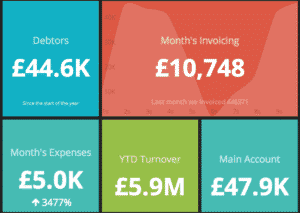
You can view this dummy example online realtime here >>
This demo is for a financial dashboard but we've extended the same tool for in-house social media monitoring, application server loads and project build statuses. In fact, any system or combination of systems that churn out data can be wired up to our real-time dashboard tool.
For demonstration purposes, we've made this example publically accessible but, naturally, dashboards dealing with sensitive data can be made highly secure and completely private.
Our dashboards are responsive so that they work, and look, just as good on mobiles, tablets and desktops and we've gone so far as to put up a screen in the office where our essential data is available to us in real-time all the time.
Want One?
We've had several clients express an interest in this technology so we decided to make this available to all. Drop any of us a line and we'll have a chat about how we can help you become more aware of your own real-time business metrics. The dashboards can be integrated into almost any enviroment or system, or run standalone.
In an age where everything is measurable, turning your business data into business intelligence can be invaluable.
Bloomin useful gems
Development Gems (Geek Alert)
During our Ruby On Rails development process at Go Tripod we’re always trying to streamline our workflow. We've tested plenty of gems supporting our everyday programming work. Some of them were interesting - but unfortunately not handy in real work, but we found a few to be really useful.
For those not into the world of development, a gem file is an archive. The archive contains a piece of computer code, a specification describing its functions and documentation. Essentially, gems are 3rd party libraries that help us quickly build applications.
In today’s entry, Slaw - one of Go Tripod’s senior developers - shares our three favourite gems.
better_errors
This is our current must-have gem. In fact, today I can barely imagine working without a better_errors entry in my Gemfile.
It replaces the current old-fashion Rails error page with a fancy one containing a lot of useful elements, like source code inspection, variables inspection and live REPL on every stack frame. Ok, but what does "live REPL" mean? According to wikipedia -
"A read–eval–print loop (REPL) is a simple, interactive computer programming environment."
Exactly! It means that we can run Ruby code on every stack frame in our browser! We can check the value of Ruby variables and run the Ruby code in our app directly from the browser. If you are not convinced about this feature, just give it a try, after some time you won't be able to work without it!
Installation is straightforward. Because of the nature of this gem, please be sure that you add the following entries to the development group!
group :development do
gem "bettererrors"
gem "bindingof_caller"
end
jazz_hands
In fact, jazzhands is not a regular gem. It is rather a bundle of great console gems, mostly based on the Pry console. I will introduce only couple of its features, if you want to find more information please visit the jazzhands github page.
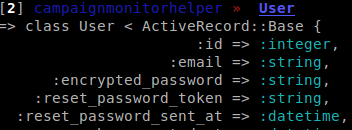
Readable Output
One of the most frustrating things in the console is completely unreadable output for non-atomic data like arrays, objects or hashes. Also, the lack of colours can be annoying after hours of work.
Additional Helpers
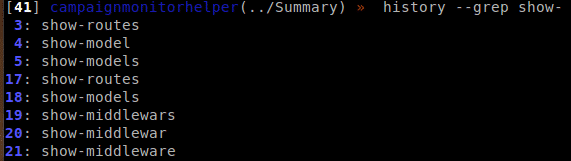
Do you want to display all routes when working in the console? Well, you need to open a new terminal.... and with jazz_hands you can use show-routes directly in the console now! You can also use show-models to display all models, show-source to display formatted and coloured source code, show-doc to display documentation or show-middleware to display list of middleware! If you want to find all show-* helpers, just type show- and press tab twice.
History Management
Do you like the Linux history command? Now you can use history in your console to check history of operations. You can also utilise the options: tail, head, grep – for instance history - -grep show-
You can re-invoke line using - -replay N option.
... just to name a few! If you want to find more you can go directly to a bundle gems pages, where you can find examples and documentation.
Installation is as easy as adding jazz_hands to your Gemfile.
Brakeman
Finally I want to describe the Brakeman gem. This is a static analysis security scanner for Ruby on Rails applications, which can catch most common vulnerabilities.
Installation is easy (like for almost every gem!) - you just need to add a brakeman entry to your Gemfile.
After installation the brakeman command is available in your system path, so you can then run brakeman in your application root directory.
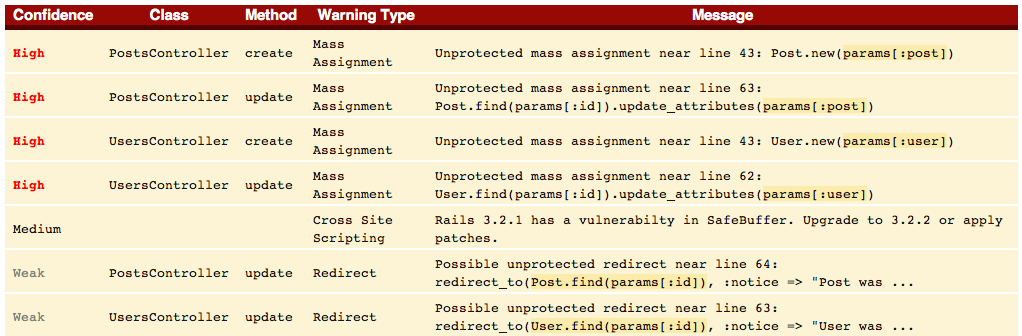
I want to cover couple useful types of vulnerabilities recognized by the Brakeman scanner:
SQL Injection
Summary.where("email like '%#{params[:q]}%'")This is one of the basic vulnerabilities in Active Record, and also often encountered. Using the where method with string interpolation containing user supplied values is open for SQL injections.
SQL Injection | Possible SQL injection near line 7: Summary.where("email like '%#{+params[:q]+}%'")Unlimited File Access
File.open("documents/#{params[:category]}")Creating a file name from data supplied by user can be really harmful. For example, here's what happens if we try to assign ‘../config/database.yml” to params[:category]...
File Access | Parameter value used in file name near line 7: File.open("documents/#{+params[:category]+}")Regular Expression vulnerability
According to http://guides.rubyonrails.org/security.htm "A common pitfall in Ruby's regular expressions is to match the string's beginning and end by ^ and $, instead of A and z."
In Ruby, the ^ and $ pair means line beginning and line end, not beginning and end of string. What does this mean in practice?
onlydigit = /^[1-9]*$/
onlydigit.match("x.match("javascript:run_code();/n123n/") # < MatchData “123” >
We have dangerous security flaw in the most unexpected place! Luckily, replacing ^ and $ with A and z will solve this issue.
onlydigit = /A[1-9]z$/
onlydigit.match("x.match("javascript:run_code();/n123n/") # nil
Why this is so important? Remember that regular expressions are used heavily in model validations!
All possible recognised vulnerabilities can be found in the documentation. Fortunately, most of the problems were fixed in Rails version 3.
Do you know any more useful development gems? We'd love to hear from you!
The Go Tripod website - a new hope
Change is good, or so they say. In our case, we wanted to do some spring cleaning and strip back our website into something a bit more us. A bit more 2014.
So here it is. We took a variety of new approaches when compared to our old site, and in this post I'm going to walk through the ways in which we deployed our snazzy yet performant new site in just a couple of days.
Stand On The Shoulders
Often we'll advocate a client starts a new website from a pre-built HTML template - it gets us up and running quickly and enables them to visualise what the final site's going to look like early on. It reduces cost for the client in a pragmatic way and gives us a solid HTML foundation to build on.
With our template selected, we selected two strong foundations: Github Pages and Jekyll. This enables us to take advantage of the speed of Github's platform and keep our entire site in a git repository with Jekyll's powerful static site generator.
We are massive fans and advocates of Github and use it everyday when we build software for our Clients. We use it to maintain sensible software source control, backups and management of everything around software development. Yes, its a wee bit geeky, we admit it and its not something we would encourage everyone to do, but we thought, what the heck - lets do this just because we can.
Working with Jekyll makes life super-simple, much more so than our previous WordPress platform, and all our blogposts are stored a simple markdown files.
We pulled apart our stock template and fitted Jekyll around it. With our freshly written content, we were already getting close to a beta version.
Polish
Our new site began with one of those parallax scrolling effects which are currently in vogue, a bit like this one on the skrollr demonstration page. I've always had a problem with this effect, it seemed sticky when scrolling the page, so when I found the same issue with our site, I took a dive into the root cause.
A superb HTML5 Rocks article on the performance of scrolling along with this excellent advice on how CSS affects painting performance by Addy Osmani gave me a couple of glaring candidates.
Our background images, which slipped past as you scrolled, were all set as background-attachment: fixed. Removing this gave us a slightly more "ordinary" feel but a much slicker experience - the browser no longer felt like it was struggling. Large fixed position elements and backgrounds are something which browsers are still struggling with in certain situations.
Clean up
Next I looked at the stuff we had left from our original HTML template. Our particular template came with a load of extra JavaScript stuff (such as the rather excellent, but unnecessary Isotope) which needed to be removed. The HTML needed to be tidied and the CSS needed to be minimised. I had a quick look at Google's Pagespeed Insights and Pingdom's Website Speed Tests.

Ok, but not great. Time to go to work.
Remove the extra JS
Pretty straightforward this one - removed 422 lines of JavaScript, some of which wasn't being executed. I also want to minimise the number of HTTP downloads we're doing for JavaScript and try to minimise the payload for those HTTP requests. I knocked up a quick shell script to do this:
# Remove existing build artifacts
rm ./assets/js/build.*

# Combine all of our JS files into build.js, maintaining the include order
cat ./assets/js/jquery.js ./assets/js/jquery.sticky.js ./assets/js/jquery.quote.rotator.min.js ./assets/js/neatshow.js ./assets/js/common.js > ./assets/js/build.js

# Use yui compressor to make a mini version
java -jar ~/Downloads/yuicompressor-2.4.8.jar --verbose -o ./assets/js/build.min.js ./assets/js/build.js
With that, I now only include build.min.js from our master template and we've achieved our goal.
Optimise CSS
I'm a fan of the SASS SCSS syntax for authoring CSS, and though the new site doesn't fully utilise it yet, I'd like to do so in the future. For now, we'll just use its ability to import other SCSS files and its compressor to produce a minified CSS file. So as well as our main site CSS, our styles.scss file includes some imports:
@import "font-awesome";
@import "google-fonts";
@import "syntax";
Then I compile it into a compressed CSS file with:
sass assets/scss/style.scss assets/css/style.css --style compressedAgain, we've got a single compressed file which we now include from our master template.
Optimise our images
If you're a Mac user, take a look at ImageOptim which bundles some great optimisation tools with a very simple UI to compress your image. By running our PNG and JPEG images through ImageOptim you get about a 10% saving on PNG images, so it's worth a try.
Now let's have a look at what our changes have done for the site.
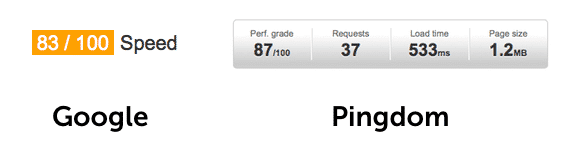
Much better!
Conclusion
We're not hitting 100% on the scores above, there's a little bit more we could potentially do. Because we opted to host with Github Pages, we're limited in our control of server-side caching options. In an ideal world we could tweak this to give repeat visitors better performance. However, I'm pleased that we've managed to polish our original template to the point where it's pretty shiny, and it gives us a great platform to take the website into the future!
SSL Heartbleed bug
You have probably heard about the SSL Heartbleed threat by now. In case you have not, here is a summary.
What is SSL?
SSL (Secure Socket Layer) is a protocol that websites use to encrypt and protect data between you and them. This happens in the background whenever you use, for example, online banking.
So what is Heartbleed?
Heartbleed is a programming error (or bug as the trade people call it) which provides a vulnerability to allow a person to intercept encrypted SSL traffic. You can read a more in-depth discussion here http://heartbleed.com
Am I at risk?
Yes and no. If you are a client of Go Tripod and we have developed an application for you, we have already taken measures and checked out all of our clients applications. We are all good.
However, other services and applications on the Internet maybe at risk. Those services providers should be checking their own services and resolving the problem. Be cautious in the meantime and contact those companies if you have any concerns.
What next?
Go Tripod will continuely monitor and keep a look out for threats and issues. Ensuring you can relax with your drink on a sunny beach in the comfort of knowing we have your back.
We have the tools and the ability to check other platforms, if you know of anyone that you think might benefit from this, pass on this email or get in touch with us.
We support you
When your application's out in the world, facing the rigours of daily use, there's always a possibility that annoying little bugs could start to appear – or, worse, that something critical breaks in an unexpected way.
That's why we're introducing GT Protect: a flexible support contract, giving you peace of mind that any surprise bugs will be taken care of quickly – without a sudden bill you hadn't budgeted for.
We will be contacting you shortly with the details sepcifically regarding your application. Of course, the support contract is not obligatory, but we hope you will find it really helpful and provides peace of mind.
For all support enquiries, problems, questions etc please use our new support ticket platform. To do this, just email your questiion or problem to support@gotripod.com and a ticket will be created for you.
5 key SEO and social considerations when redesigning your website
As you can see, we’ve given the website a bit of a spruce up over the past few months. Hopefully, we’ve improved the usability of the site, and the updates will assure our customers (and prospective ones), as well as Google, that we are moving with the times and our content is fresh.
Our updates have been mainly cosmetic, but it did alert us to a number of SEO and social considerations that are worth bearing in mind if you are due to do similar work – and they are absolutely essential if you are planning a more comprehensive overhaul.
1. Strategy
It might seem obvious, but planning is essential. Pore over your analytics data to see how folks are using the site currently and ask yourself which content is performing best and which might need improving. Work out and prioritise the key areas you are looking to change. For search, this a great time to ensure the keyphrases you are ranking for in Google etc are as relevant (and converting as well) as they were when you last updated (or originally launched!). Ensure you have a complete migration strategy in place if you are moving altogether.
2. Domain Name
In simple terms, your domain name is your web footprint to date. Search engines favour websites whose domain names display authority from their age, the amount of relevant content displayed on their pages and the links it crawls from other sites to yours. Changing this without due care will lose all trust from Google et al. and you might unnecessarily be starting from scratch. However, there are certainly times when changing your domain might be important or essential. If so, ranking problems can be minimized by permanently 301 redirecting your old domain to the new one and seeing to update those who link to you (especially the big ones) that you’ve moved.
3. Links and Landing Pages
This is a similar issue to what I mentioned above. But you can still run into problems with broken links from websites (hindering your search rankings) and social platforms (potentially affecting traffic from web-users). As above, being sure to redirect old pages to new pages will help. Essentially, you want to ensure that any of the old routes users might have used to get to your site before are ending up in the most relevant place possible, and not at some ugly error page…
4. 404 Error Pages
You might be keeping your domain name and have been through your links with a fine tooth comb, but there is always the possibility someone might end up on a page where there is no content anymore – especially during/after a redesign. However, all is not necessarily lost. Customize your 404 Error Pages to ensure users know they are still on the right website, there is a problem and you apologise, and that there are easy links to click through to somewhere relevant.
5. Transparency
When redesigning your website, keep your audience updated with the process via your blog, newsletters and social channels. This can be a great opportunity to pool the opinions of your community and to alert them that things will be different and possibly slightly amiss. Facebook is perhaps an example of a site which doesn’t do this so well – judging by the amount of complaints they get from disgruntled users when they implement changes. On that note, if you notice anything strange with our redesign or have any feedback, please get in touch!
The other platforms: where businesses are seeing social media opportunities
Businesses and organisations with a social media presence are becoming an increasingly everyday occurrence. Yet, as companies continue to experiment with new digital channels to reach existing and fresh audiences, the number of social platforms available is becoming ever-greater and even more diverse.
Sites such as Pinterest, Google+ and Tumblr may not be boasting the same kind of user numbers as Facebook and Twitter, but for many their value lies in the quality of traffic rather than the quantity. So just how suitable are this fresh crop of social networks for business-shaped endeavours? And should Facebook and Twitter be worried?
Perhaps the social media platform with the most buzz currently, Pinterest allows its users to ‘pin’ content (such as images and video) to digital pinboards by uploading from their own devices or using the ‘pin it’ button to save stuff from other user’s boards.
The site boasts a uniquely female-skewed user base and is seeing some businesses including Sony and Confused.com engaging well with audiences. Fashion and craft retailers are also reporting good value. One example is Boticca, a jewellery and accessories site which has seen Pinterest become its No. 1 social referrer and ‘pinners’ spending more money on average when they get to the site.
Google+
Google’s latest entry into the world of social media has been quick to entice brands. This is little surprise, the platform already has 90m+ users (according to PlusDemographics.com) and the name itself commands a certain degree of authority.
Rather than ‘fans’ or ‘followers’ as with Facebook and Twitter, Google+ deals in circlers. According to a recent report from Simply Measured, 22% of the top 100 brands on Google+ have more than 100,000 circlers with the automotive industry proving the most popular vertical. However, engagement is a big question with the service. Simply Measured sees engagement improving for brands, too – but it remains to be seen whether this and circler numbers convert.
Another benefit emerging is Google ranking Google+ posts in search rankings (top right of the SERPs) – fresh content via Google+ may be a good way to get your brand seen in Google aside from the organic and paid search listings.
Tumblr
Tumblr is referred to as a blogging service and a microblogging service, but also blends elements similar to Pinterest (quick reposting from other Tumblogs) and Facebook (a newsfeed). Ultimately, it is a very simple way to post content online – and easily adaptable should you want to post more visual content, or more typical text-based fare.
The service is already home to more than 30m blogs, with an audience which is largely made up of younger users (56% are under 34, according to Mashable). Unsurprisingly, businesses with this target demographic in mind are already trying out the service in an effort to engage users and drive them to their websites. To date, posts with a visual aesthetic are performing best (i.e. being shared most) and businesses producing this kind of content – including fashion, music and food – are finding the most value in the service.
A threat to Facebook et al?
Pinterest, Google+ and Tumblr are all relative newcomers to the social scene and are all seeing relatively impressive growth in popularity and engagement. As with all new networks, it takes a little bit of time to see whether the effort businesses are taking to establish a presence pays off in terms of users coming to their sites and spending money.
The key is for businesses to remember to research the type of companies and content which look to be doing well on newer social services, before taking the time to dive in. But it is important to acknowledge that there is more to social media marketing than making a Facebook page – and there may be networks where the kind of content you’re producing can go that bit further, or can have other benefits beyond simply spreading your posts far and wide.
Sencha Touch - deploying to production
When examining how to build a new Sencha Touch 2 application for production, I wanted to make sure I wasn't reinventing the wheel. I'd heard of Sencha's commandline SDK tools but this gave me cause to look into it more. Now that I've done so, I'm impressed, but I think the documentation could be doing with a little more detail. I'm concentrating solely on deployment for now, though the tool supports other scenarios.
There were a few things we wanted to do:
- Build, concatenate and minimise our custom SASS theme
- Resolve dependencies (in order!) for our JS, then concatenate and minimise
- Work out how to incorporate those into our index.html with sensible versioning
- Ensure all our caching policies were optimal
With one exception, Sencha's tool helps us with that. I recommend getting an overview of how to install the SDK Tools at the Sencha Documentation pages first. That guide also gives an overview of the various facilities the tool provides.
Setup
If you've used the sencha command to create a new application then you're good to go - you have all the files you need to get building. If not, I recommend you use it to create a new, empty application, and copy over the bits you need to get up and running, and to make sure you're adhering to the correct directory structure. The documentation does give a good overview of the directory structure which is required - take a look at the section "Understanding Your Application's Structure".
Once you're there, you'll have an app.json in the root of your project. It's important that you complete this correctly in order to be able to build your project successfully; the "js" section needs to have any extra JavaScript dependencies - such as third-party libraries - entered.
You don't need to add in all of the files you use in your application. The sencha command will resolve all of those dependencies automatically when you build. You do need to make sure you're using requires in your application to make the dependency tree clear, but hopefully you're doing that anyway.
Assuming you've got app.json ready to go, we can move on to making a build.
Index.html
Generally you'll access your project via http://localhost/index.html, or something similar. The app.json file will have asked you to specify this URL, and you should have a template index.html created for you if you used the sencha command to generate your new project. Your index.html should have the following line:
This is a key part of the build process, so you need to leave it intact!
Building
The aspect we're interested in is run via the command:
sencha app buildIf you run it without theparameter you'll see the following:

This gives you an idea of what's going to happen. Here's the way the build process works:
- Copies required resources
- Resolves dependencies by firing up a headless web browser and running your app
- Concatenates and minifies your JS in the correct order
- Builds a HTML5 cache manifest
- Generates delta files to minimise what changes get sent to the client
- Generates a new version of your index.html
There's lots happening here, and it depends on what environment you specify when you run the command. To be clear, you can always keep using http://localhost/index.html, and that's your development version.
Testing Environment
Testing creates a/build/testing/ directory, and you can access the build at http://localhost/build/testing/index.html. In the testing environment, JS gets concatenated but not minified. It doesn't do any of the caching/manifest stuff described above, but does resolve all your dependencies into the concatenated file.
Production Environment
In addition to the steps taken to build for the testing environment, production will also minimise your JS, create a cache manifest, and as the documentation says: "Storing all JavaScript and CSS assets inside Local Storage on first load, and patches them via delta updates between releases". The Sencha blog post goes into more detail on this subject.
Issues
We're yet to deploy our application to production, so this post is a work in progress. In particular the testing and production builds highlight code issues that aren't apparently on development - deprecation warnings become errors, and there are various issues with the order in which our code is included. I'm also a little concerned with the delta update mechanism - I need to do further testing to make sure updates are indeed pushed to clients as expected, as we always want to make sure that they have the very latest code.
You'll also notice that the sencha command doesn't do anything with SASS. Hopefully this will come in future, but it's a simple extra command to generate the theme CSS.
Conclusion
The sencha command has become an integrated part of our build process. I'd like to see more documentation, and the proof will be in our final deployment, but it looks like Sencha have provided another key part of the end-to-end development of a mobile application.